Create brand guidelines for a client.
What a client needs from brand guidelines, what to put in them, how to run the work from the first questions to the handover, and whether to deliver a PDF or a website. By hand, and with Linyal.
Updated
In short. Start with the client’s own words, finish the logo, then write the guidelines for the people who will use them: the logo and its versions, construction, clear space and minimum size, colours with every value, typography, imagery and applications, with the files. Have the client approve one version, then hand over the guideline and the files.
Who the guidelines are for
Not for you. You know the brand. Brand guidelines are for the people who will use it after you hand it over: the client’s marketing team, the printer, the developer building the website, the next agency, and now the AI tools the company writes and designs with.
Each of them needs something different. The printer needs CMYK and Pantone values and a minimum size. The developer needs HEX values, the fonts and an SVG. The marketing team needs to know which logo to use where, and what not to do with it. Write each section so the person who needs it can act on it without asking you.
What to include
- Brand story
- What the company does, its mission and values, in a few sentences people can repeat.
- Logo
- The main logo and every version: the mark alone, the wordmark, the lockups, on light and on dark.
- Construction
- The geometry the logo is built on, so it can be rebuilt at any size.
- Clear space and minimum size
- The space nothing may enter, and the smallest size on screen and in print.
- Misuse
- The logo stretched, recoloured or crowded, made from the logo itself.
- Colours
- Every colour with HEX, RGB, CMYK and Pantone values, and which colours may sit on which.
- Typography
- The typefaces, where to get them and their licences, and the type scale.
- Imagery and graphic elements
- The photography, illustration, icons and patterns, with what makes one right for the brand.
- Voice and tone
- How the brand sounds, and what it would never say.
- Applications
- The brand in use: business cards, social media, signage, the website.
- Downloads and contact
- The files themselves, and who to ask when the guidelines don’t answer.
Leave out what the brand doesn’t have. Twelve sections that are true are worth more than thirty that pad the page.
The work, step by step
Ask before you design
Send the client questions in writing: what the company does, in their own words, who it talks to, how it should sound, what it would never say, which brands they admire and what they already have. Their answers become the brand story and the voice.
Finish the logo first
Guidelines describe a finished logo. Check the artwork before you document it: radii that should match, curves that should share a centre, strokes of one weight. Then draw its construction and clear space from the artwork itself.
Prepare the files
Export every logo version in SVG, PNG and PDF, in colour, black and white, and name the files so anyone can tell them apart.
Build the guidelines
Start from a structure, add the sections above in the order a reader needs them, and show each rule with the brand’s own artwork.
Present it and agree a version
Walk the client through it, take their changes, then have them approve one version in writing: the version that counts when someone later asks what was agreed.
Hand it over
Give the client the guidelines, every file, the font licences or where to buy them, and an answer to one question: who may change the guidelines from now on.
PDF or website
| Website | ||
|---|---|---|
| Updating it | A new file, sent again | Changed in one place |
| Knowing it is current | Old copies stay in inboxes | One address, always the latest |
| Sharing a part | Page numbers | A link to the section |
| Files | Attached or linked separately | Downloaded where they are described |
| Print and offline | Made for it | Needs a printed copy |
| AI tools | Read as one document | Readable by tools that can open a page |
With Linyal
Send the questionnaire
Enter the client’s company and email and press Send questionnaire. Linyal emails them a link in your studio’s name; they answer with no login, and their answers are kept as they go. Press Read the website and Linyal suggests a tone of voice, a mission and a vision, each with the page it came from. Nothing goes in until you accept, edit or dismiss it.
Push the logo from Illustrator
The free Linyal extension measures the logo and flags near misses, such as two radii 0.14 pt apart. Push the brand to the workspace when it is ready, or upload an SVG.
Build the guideline
Choose one of four templates (Editorial, Swiss, Chapter or Plate) and refine its layouts, type and words in the builder. The construction, clear space, colours and logo files come from what you pushed.
Share it for approval
Share the latest version on a link, with a password and an end date if you want them. The client opens it, gives their name and email, and approves that version from a one-time link sent to their email. They need no account.
Hand the brand over
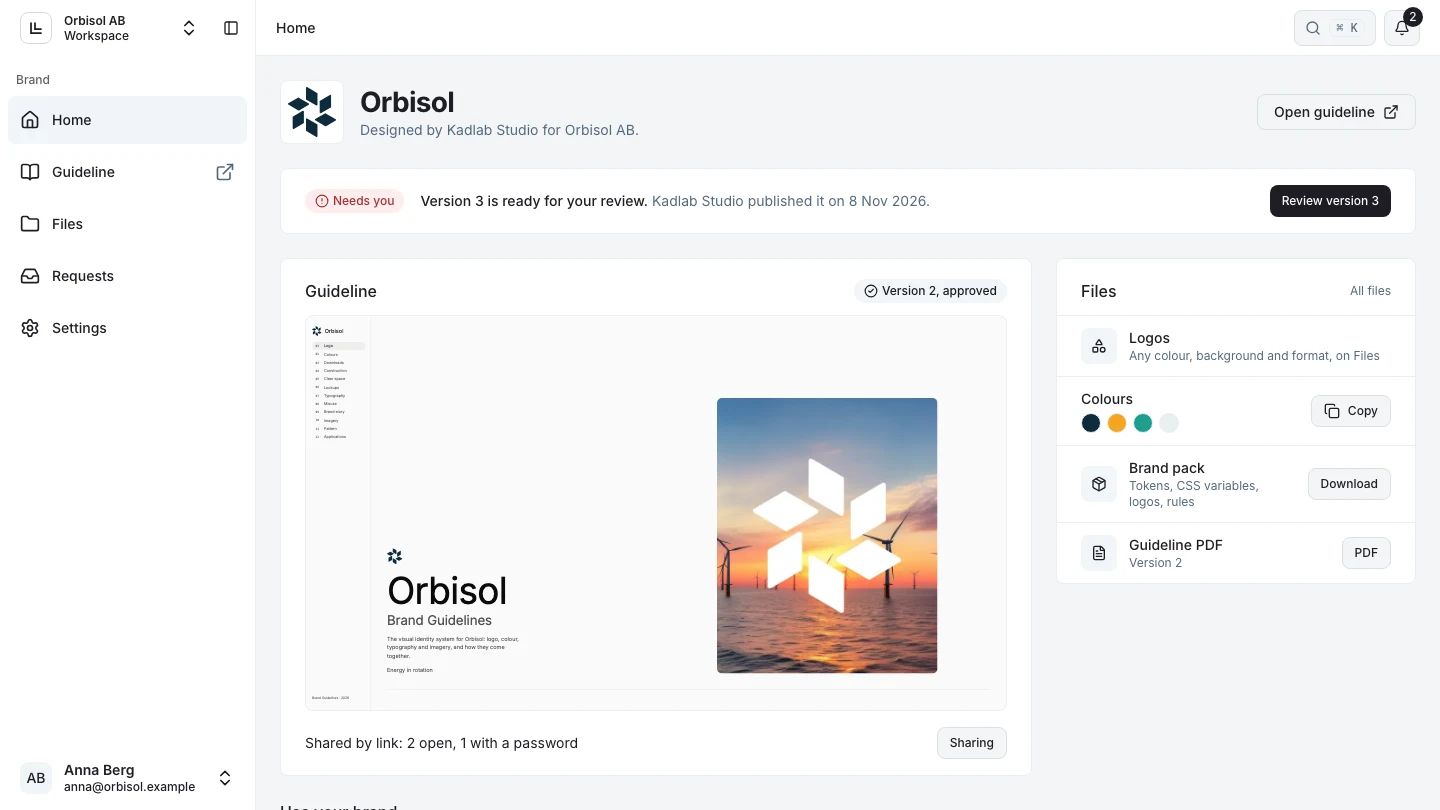
On the brand’s Client tab, enter the client’s company and their admin’s email. The company gets its own brand home: the guideline, the logos in every format, the PDF, a brand pack for developers, email signatures for its people, links for printers that expire, and the brand for its AI tools over MCP. Its first month is free.
Keep working on it
You stay on the brand as a member of the company. From the handover on, the company comments on each section of the guideline and approves each new version before it is served. Your credit line, if you gave one, stays on the guideline, and no Linyal mark is added to it.
Before you hand over
- The client has approved one version, and you know which.
- Every logo version is in the files, in SVG, PNG and PDF.
- Every colour has its HEX, RGB, CMYK and Pantone values, checked against the artwork.
- The fonts are named, with where to get them and what their licence covers.
- The construction and clear space match the artwork, not an idealised version of it.
- Someone at the company is named as the brand’s owner.
- You and the client agree who may change the guidelines, and how.
Questions
- How long should brand guidelines be?
- As long as the brand needs and no longer. A small company often needs ten to fifteen sections. Leave out what the brand doesn’t have, and say each rule once, with a picture of it.
- Should I give the client the source files?
- Agree it in the contract before you start. Most clients need the finished logo files in SVG, PNG and PDF; the working Illustrator files are often kept by the designer or sold separately.
- Who owns the brand guidelines after the handover?
- Whoever the contract says. In Linyal the brand moves to the company on the handover: the company owns it, and the designer keeps working on it as a member of the company.
- What if the client wants changes after approving?
- Make them as a new version and have it approved again, so the approved version stays what it was. In Linyal, the files and the public page keep serving the approved version until the new one is approved.