Draw a logo’s construction in Illustrator.
A logo’s construction shows the circles, lines and proportions its outline follows. What to put in it, how to draw it by hand in Illustrator, and how Linyal draws it from your artwork.
Updated
In short. A construction drawing shows the geometry a logo is built on: the circles its curves follow, the axes it mirrors about, the lines its edges share and the unit its strokes repeat. Draw it from the finished artwork, show only what the outline really follows, and put it in the brand guidelines beside the clear space.
What a construction drawing is for
It tells the people who rebuild the logo how it is built: the sign maker cutting it at 2 m, the developer redrawing it as an icon, the next designer on the brand. It also shows the client the decisions behind the drawing. Designers often call it a construction grid.
It is only useful if it is true. Many construction drawings are added after the logo is finished, and some lay circles over curves that don’t follow them. A drawing that claims geometry the outline doesn’t have misleads exactly the people it was made for.
What to show
- Circles
- The circles the curves follow, drawn whole, with their centres.
- Axes
- The lines the mark mirrors about.
- Shared edges
- Lines that two or more edges sit on, run past the mark so the alignment shows.
- Tangents
- Where a curve meets a straight line without a corner.
- Unit
- The thickness the mark repeats, such as its stem, written as x.
- Proportions
- The width, the height and the main sizes, in x, so the logo can be rebuilt at any size.
Show fewer lines rather than more. A drawing with every possible tangent reads as noise; the client and the sign maker need the five or six relationships that hold the mark together.
Draw it by hand in Illustrator
Put the mark on its own layer
Copy the mark to a new layer and lock the original, so nothing you draw can move it.
Turn on Outline and Smart Guides
Choose View › Outline (Cmd+Y on a Mac, Ctrl+Y on Windows) to see the paths without their fills, and View › Smart Guides to snap to anchor points and centres.
Find the circles
With the Ellipse tool, hold Alt (Option on a Mac) and Shift and drag from where a curve’s centre should be. Adjust the circle until it sits on the curve, then zoom to 3,200%: a circle a fraction of a point off is plain to see there.
Draw the axes and shared edges
With the Line Segment tool, snap to the anchor points and draw each line well past the mark. Keep only the lines that two or more edges really sit on.
Mark the unit
Draw a square the width of the stem, typing its size in the Transform panel, and set copies of it where the mark repeats that thickness.
Style it
Use one thin line colour, about 0.25–0.5 pt, and dim the artwork under it, so the construction reads first.
Check it before you hand it over
Every circle should follow its curve along the whole arc. If one only nearly fits, the curve is either a near miss or not part of a circle; don’t draw it as one.
When the drawing almost fits
Two radii that differ by 0.14 pt look the same on screen. Drawn as one circle, they become a claim the sign maker will trust and the cut letters won’t keep. Decide each one: correct the artwork, or keep the difference as an optical correction and leave it out of the construction.
Optical corrections are normal. Round shapes reach a little past the baseline and cap line so they look as tall as the flat ones, and shapes aligned exactly can look misaligned. A construction drawing shows the geometry; it doesn’t have to win over the eye.
Draw it with Linyal
Linyal is an extension for Illustrator 2025 (v29) or newer, on Mac or Windows. It measures the mark you select and draws its construction from that measurement, so the drawing shows only relationships the outline follows.
Select the mark
Open Window › Extensions (legacy) › Linyal and select the mark. The Logo tab measures it; Findings lists what was drawn almost, but not exactly, the same, such as two radii 0.14 pt apart.
Save it as the brand logo
Press Save as brand logo, at the foot of Findings or Specs. A look can be kept with the brand only once the logo is saved.
Pick a look
On the Construction tab, pick Plain, Points, Pen tool, Guides or Circles. The drawing above the controls is a live preview, and its caption counts it, such as “14 paths · 4 circles, 6 lines”.
Choose how much it shows
Under Elements, set the Amount of detail: Essential, Structure, Detail or Full. Each adds the next relationships Linyal can prove. Switch the ten layers, from Outline to Lattice, on or off. A look is a starting point; change anything in it.
Keep it with the brand
Press Use this look. The line over it reads “Kept with the brand, and pushed with it”, and Draw construction comes back.
Draw it
Press Draw construction. Plain goes on a locked layer of its own; a look with a ground goes on an artboard beside the logo, never over your drawing.
Pro. Draw construction is Extension Pro. The measurements, the live preview, every control and Use this look are free.
Put it in the guidelines
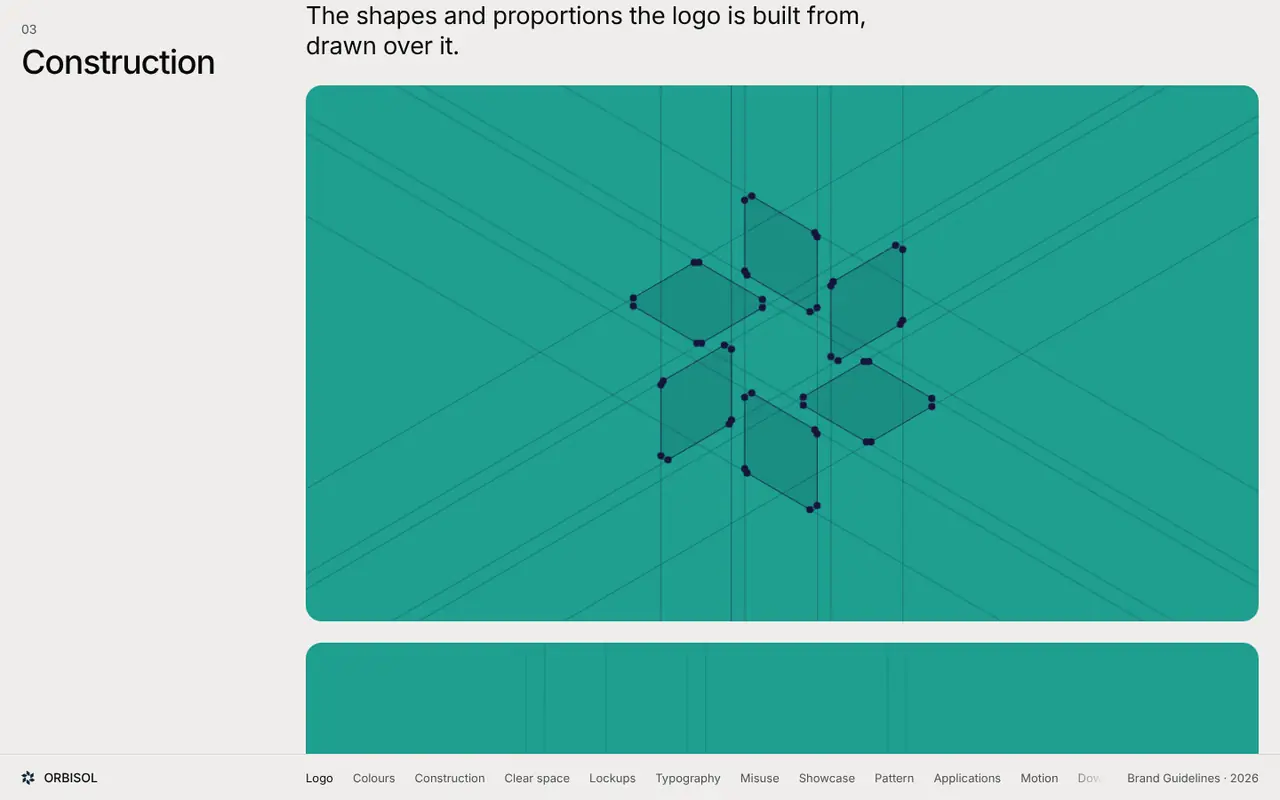
Give the construction a page of its own, next to clear space and minimum size, and name the unit under it. In Linyal it goes with the brand to the workspace and onto the Construction page of the guideline, and of the Studio deck in Illustrator.
Questions
- Does a logo have to be drawn from geometry?
- No. Many good marks are drawn by eye and corrected optically. A construction drawing describes the geometry the outline follows; it doesn’t have to be where the design started.
- Do I need the golden ratio?
- No. Show the ratios the mark really uses. Circles placed to suggest a ratio the outline doesn’t follow are decoration, not construction.
- Can I draw the construction of a logo someone else designed?
- Yes, from its vector file. Linyal reads the paths you select. It doesn’t read live text, symbols, images, blends or meshes, or more than 4,000 points or 500 items; see Known limits in the Docs.
- Does Linyal change my artwork?
- Only when you press a button. Clean up removes anchor points that change nothing; Draw construction and Draw clear space add layers of their own that you can delete; Save as brand logo leaves the drawing as it is.
- Is it free?
- The measurements, the live preview and every control are free. Drawing the construction on the artboard is Extension Pro.